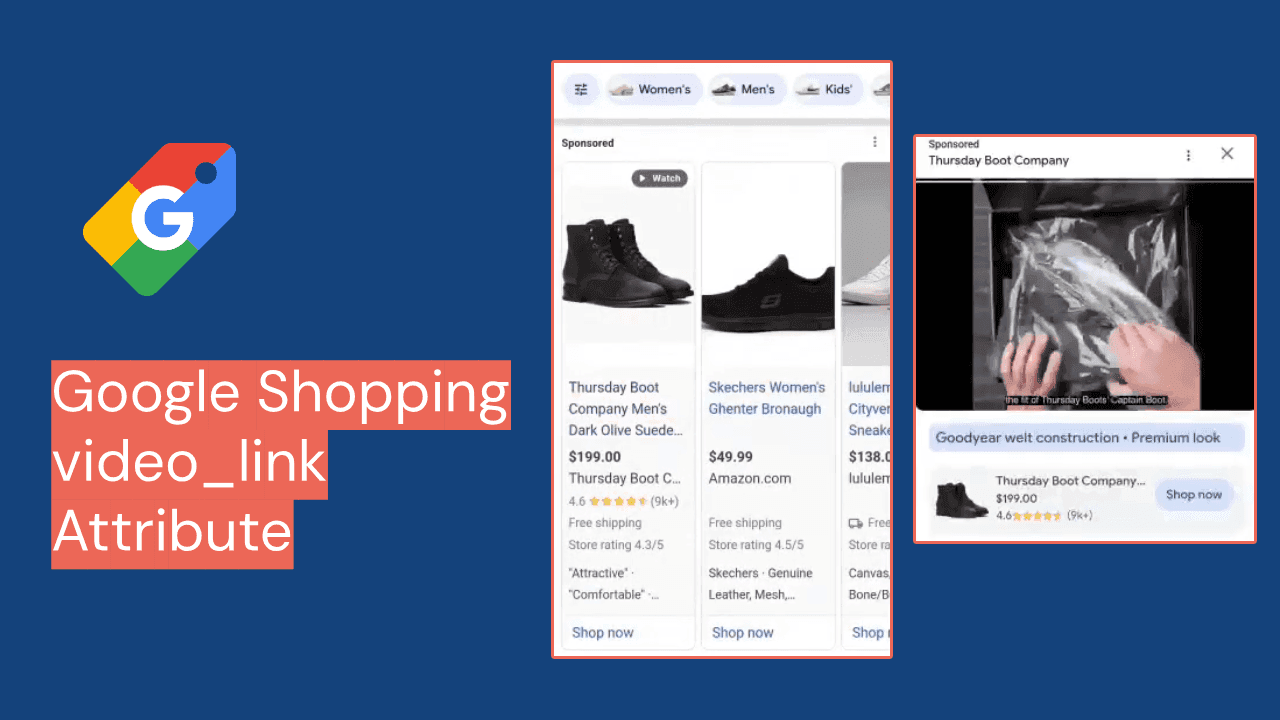












Demand Gen used to be the campaign type you ran for reach on YouTube and Discover. In 2026 it became a feed campaign. Smarter Ecommerce (smec) reported in July that product feeds are attached to 35% of Demand Gen campaigns, up from 16% in 2024 and 26% in 2025, according to PPC Land's write-up of the data. smec has not published its sample size, so treat the figure as a direction rather than a benchmark. Two changes this year make the feed matter more: Google now lists custom labels as a Demand Gen filter, and standalone Display campaigns are being folded into Demand Gen.
This playbook is for e-commerce teams and agencies already running Shopping or Performance Max from a Merchant Center feed. By the end you will know what to check in the feed, how to set up feed labels and custom labels for Demand Gen filters, how to limit overlap with Performance Max, and what to measure first.
What Demand Gen does with your Merchant Center feed
When you switch on "Run a product feed campaign" in a Demand Gen campaign, Google pulls products from a linked Merchant Center account and renders them as a carousel inside the ad. Google's Demand Gen product feed help page lists three ad formats that can carry products: image and products, video and products, and products only. The products themselves "will automatically render in a carousel format."
Google's About Demand Gen campaigns page says feed ads can serve on YouTube (including Shorts), Discover, Gmail and the Google Display Network. GDN is there because of a change announced on 26 May 2026: Google is retiring standalone Display campaigns, with a migration tool from June 2026 and automatic migration running through 2027, as Search Engine Journal reported. Eligible Display campaigns will end up inside Demand Gen.
Step 1: Confirm the account and feed are eligible
Each check comes from Google's product feed requirements for Demand Gen.
- Merchant Center is linked to Google Ads. If the account is missing from the campaign's Product feeds section, check the link.
- "Shopping ads" is enabled as a marketing method in Merchant Center. Free listings alone are not enough.
- Products are available in every target country. Multi-region feeds need explicit target locations so products and users are matched by country.
- You are not relying on regional pricing. Google states that Demand Gen campaigns "don't support Regional Availability and Pricing (RAAP) feeds."
- Your category is allowed. Google's Demand Gen overview says advertisers promoting alcohol cannot use product feeds.
Decision point. If you rely on RAAP for regional prices, run Demand Gen only on products whose price is the same everywhere. Google mentions workarounds but does not document them on that page.
Step 2: Plan feed labels, because each campaign gets exactly one
Google is explicit: "You can select only one feed label per campaign" (source). In the Google Ads API the same choice is the optional feed_label field on the campaign's ShoppingSetting, next to the required merchant_id (Google Ads API, Demand Gen with product feeds, updated 2026-10-30).
This matters for brands selling in several markets from one Merchant Center account, common across Turkey and the Gulf. A retailer shipping to Turkey, the UAE and Saudi Arabia usually has feed labels such as TR, AE and SA, each with its own currency. In Demand Gen that means three campaigns.
| Feed setup | Demand Gen structure | What to watch |
|---|---|---|
| One country, one feed label | One campaign, select that label | Nothing special |
| Several countries, one label per country | One campaign per label, location targeting matched to the label | Budgets split by market; reporting per campaign |
| Several languages for one country (Arabic and English in the UAE) | One campaign per language label, audiences or language targeting aligned | Titles and images must match the ad's language; see our guide to structuring Arabic and English feeds |
Our default is one campaign per feed label; "Use all available feeds" hides which market carries results.
Step 3: Fix the images the carousel will show
Google asks for square (1:1) product images and notes that images with a 0.6 to 1.4 aspect ratio "get sufficient coverage," with the caveat that images may be auto-cropped (source). For YouTube Shopping ads on connected TV, Google requires product images of 500 x 500 pixels or greater.
In practice the work is:
- Find images outside 0.6 to 1.4. A 1000 x 2000 fashion image is a 0.5 ratio and will be cropped hard.
- Find images under 500 x 500. Merchant Center's own image best practices also give 500 x 500 as the minimum and recommend 1500 x 1500 or larger. We covered the clean-up in fixing image links before the 500 x 500 minimum.
- Keep text off the main image. The same Merchant Center page disapproves images that contain text, watermarks, promotional claims or logos. Put your offer in the Demand Gen headline, description or a promotion asset instead.
A common assumption to drop. Google's lifestyle_image_link page only says lifestyle images can show in free listings. It does not mention Demand Gen, so fix image_link first.
Step 4: Front-load titles for a short card
Carousel cards show little text. Google's Demand Gen guidance says product titles should usually be under 65 characters (source). Shopping titles built for search, with a long attribute string, get cut before the part that sells.
A worked example for a Turkish homeware brand (the brand and product are invented for this guide):
Before:
Lunara Home Bambu Pamuklu Çift Kişilik Nevresim Takımı 200x220 cm Antrasit Gri 4 ParçaAfter:
Bambu Pamuklu Çift Kişilik Nevresim Takımı, Antrasit
The brand already sits in the ad's business name field, and size and piece count matter more to search than to a carousel card. In Feedance this is a text rule scoped to one channel; Feed Rules change that channel's output while leaving source data untouched.
Decision point. Shopping, Performance Max and Demand Gen read the same Google feed, so one item ID gets one title. Either write a title that works for all three (product type first, under 65 characters where possible) or create a separate feed label for Demand Gen, which doubles your item count. Most teams should choose the first.
Step 5: Build custom labels Demand Gen can filter on
Since June 2026, Google's custom label documentation says labels let you "create specific filters to use in your Performance Max, Shopping, or Demand Gen campaigns." PPC Land reported the change on 28 June 2026 as a documentation update rather than a launch announcement. Display campaigns with dynamic remarketing still use different attributes.
The limits are unchanged: values are 1 to 100 characters, one value per attribute per product, up to 1,000 unique values per label account-wide and 5,000 across all five (source).
One quirk: at setup you choose a single filter method (brand, product ID, condition, product type or a custom filter), with values combined by OR. Afterwards you can add subdivisions and exclusions, combined by AND (source). Pick the label you build on first.
Example feed rows, written for this guide:
| id | custom_label_0 (season) | custom_label_1 (role) | custom_label_2 (price band) | custom_label_3 (stock) |
|---|---|---|---|---|
| DUV-1042 | winter | hero | 1000-2000 | deep |
| DUV-1043 | winter | hero | 1000-2000 | low |
| MUG-0311 | all-year | add-on | 0-250 | deep |
| TBL-0880 | all-year | new | 5000+ | deep |
In XML the first value reads <g:custom_label_1>hero</g:custom_label_1>. A Demand Gen build on this feed might start with custom_label_1 = hero OR new, then add an AND exclusion for custom_label_3 = low so the carousel does not push items about to sell out. Labels like "role" or "stock" only work if a rule recalculates them on every sync. You have only five labels and Performance Max already uses some; see our comparison of custom labels, product type and item ID for listing groups.
Step 6: Decide what Demand Gen should show that Performance Max already shows
smec argues that feed-based Demand Gen "can have an uncomfortably high degree of overlap with what PMax is trying to do" (PPC Land). It has published no overlap figures, and other practitioners in the same piece disagree.
From the feed you control product selection:
| Option | Feed setup | When it fits |
|---|---|---|
| Whole catalog | Root listing group, no filters | Small catalogs, or when you want Google to choose. Google's own guide suggests this as one option |
| Discovery set | Filter to new and seasonal labels | Products with little search demand yet, where YouTube and Discover reach adds something Search cannot |
| Hero set | Filter to a short list of best sellers | Short promotions; pairs well with promotion assets |
Google supports one-product campaigns but recommends at least four and calls 50 the best practice (source).
Step 7: Launch, wait, then measure at product level
- Add a root listing group to every product ad group, even one targeting all products. The Google Ads API documentation recommends this to enable product-level reporting (source).
- Give it a fair test. Google suggests target ROAS if you report conversion values, a daily budget of about 10 times expected CPA, and 1 to 2 weeks without bid or budget changes (source).
- Do not pause the feed mid-test. Google warns it "may negatively impact performance."
- Consider promotion assets on Shorts. Since November 2026 Demand Gen can show discount tags on YouTube Shorts and in-stream, only for campaigns with a Merchant Center feed (PPC Land, 8 November 2026). It is a Google Ads asset, not a feed attribute.
- Read results by label. Compare each Step 5 label group with Performance Max results for the same products and dates.
Google says established campaigns with large product selections "typically see a 33% increase in conversions" after adding feeds (source). That is Google's figure about its own product, with no published method. Trust your own comparison.
Pre-launch checklist with pass criteria
| Check | Pass when |
|---|---|
| Merchant Center link and Shopping ads marketing method | Account appears under Product feeds in the campaign |
| Country availability | Every target country has approved items in the chosen feed label |
| RAAP and restricted categories | No dependency on regional pricing; no alcohol products in the selection |
| Feed label plan | One campaign per label, location targeting matches |
| Image ratio | Selected items fall within 0.6 to 1.4; ideally 1:1 |
| Image size and text | 500 x 500 or larger; no text, logos or watermarks |
| Titles | Product type first; under 65 characters where possible |
| Custom labels | Recalculated on every sync; within 1,000 values per label |
| Product count per ad group | At least 4 in-stock items, ideally 50 |
| Reporting | Root listing group present in every product ad group |
Where this playbook breaks down
This guide covers retail products in Merchant Center. Travel, real estate, automotive and local services use the separate Business data feed for Demand Gen, which TechWyse reports currently serves only on the Display Network, not YouTube or Discover. We have not covered that setup.
The overlap question in Step 6 has no published answer, smec's figures have no published sample, and Google's uplift claims come from Google. This guide gives you a structure to test, not an expected result.
Feedance prepares the feed: labels, titles, images and channel rules. It does not run campaigns or manage bids. For creative production and testing inside the ad platforms across many accounts, tools like Smartly are built for that job. Rule-based custom labels are standard in DataFeedWatch, Channable and Productsup too, and this method works in any of them.
Frequently asked questions
Can I use the same Merchant Center feed for Performance Max and Demand Gen?
Yes. Both read the same linked Merchant Center account. Each item ID has one title and one set of custom labels, so changes made for Demand Gen also reach Performance Max and Shopping.
Can a Demand Gen campaign use more than one feed label?
Only through the "Use all available feeds" option. Otherwise Google allows one feed label per campaign. For multi-country catalogs we recommend one campaign per label so currency and reporting stay separate.
Do custom labels work in Demand Gen?
Yes. Since June 2026 Google's custom label documentation lists Demand Gen alongside Performance Max and Shopping. Use them as a custom filter at setup or as subdivisions afterwards.
What image size does a Demand Gen product carousel need?
Square is best; Google says ratios from 0.6 to 1.4 get sufficient coverage. Connected TV placements need at least 500 x 500 pixels, and Merchant Center recommends 1500 x 1500.
How many products should a Demand Gen product campaign have?
Google supports campaigns with a single product but recommends at least four and calls 50 the best practice. If a filter leaves fewer than four in-stock products, widen it.
Will my Display campaigns move to Demand Gen?
Eligible ones will. Google is retiring standalone Display campaigns, with automatic migration through 2027, and Display inventory stays available inside Demand Gen.
Check your feed before you launch
Most of these steps come down to images, titles and label coverage. Run your feed through the free product feed audit tool to see where it stands before you add a Demand Gen campaign on top of it.
Sources
- Google Ads Help: Use a product feed to show your products in Demand Gen campaigns
- Google Ads Help: About Demand Gen campaigns
- Google Ads API: Demand Gen campaigns with product feeds (updated 2026-10-30)
- Merchant Center Help: Custom label [custom_label_0-4]
- Merchant Center Help: Lifestyle image link [lifestyle_image_link]
- Merchant Center Help: Image best practices
- PPC Land: Demand Gen feed use hits 35% as PMax advertisers face Q4 overlap (28 July 2026)
- PPC Land: Google quietly unlocks custom labels for Demand Gen campaigns (28 June 2026)
- PPC Land: Google Demand Gen ads can now show discount tags on YouTube Shorts (8 November 2026)
- Search Engine Journal: Google is retiring standalone Display campaigns in favor of Demand Gen (26 May 2026)
- TechWyse: Google opens Demand Gen feeds beyond retail, but keeps them off YouTube and Discover

Co-founder of Feedance, where he leverages his background as a computer engineer and marketer to drive analytical insights. With a strong focus on transforming data into actionable strategies, he is dedicated to helping brands achieve significant growth in the digital landscape.
LinkedIn